
Use King Addons Header & Footer Builder to create a header or footer, design it in Elementor and assign display locations. The core builder works with free Elementor.
Before you start
WordPress, Elementor and King Addons. Pro is needed for locations labelled Pro in the display picker.
Set it up in WordPress
Open Header & Footer Builder
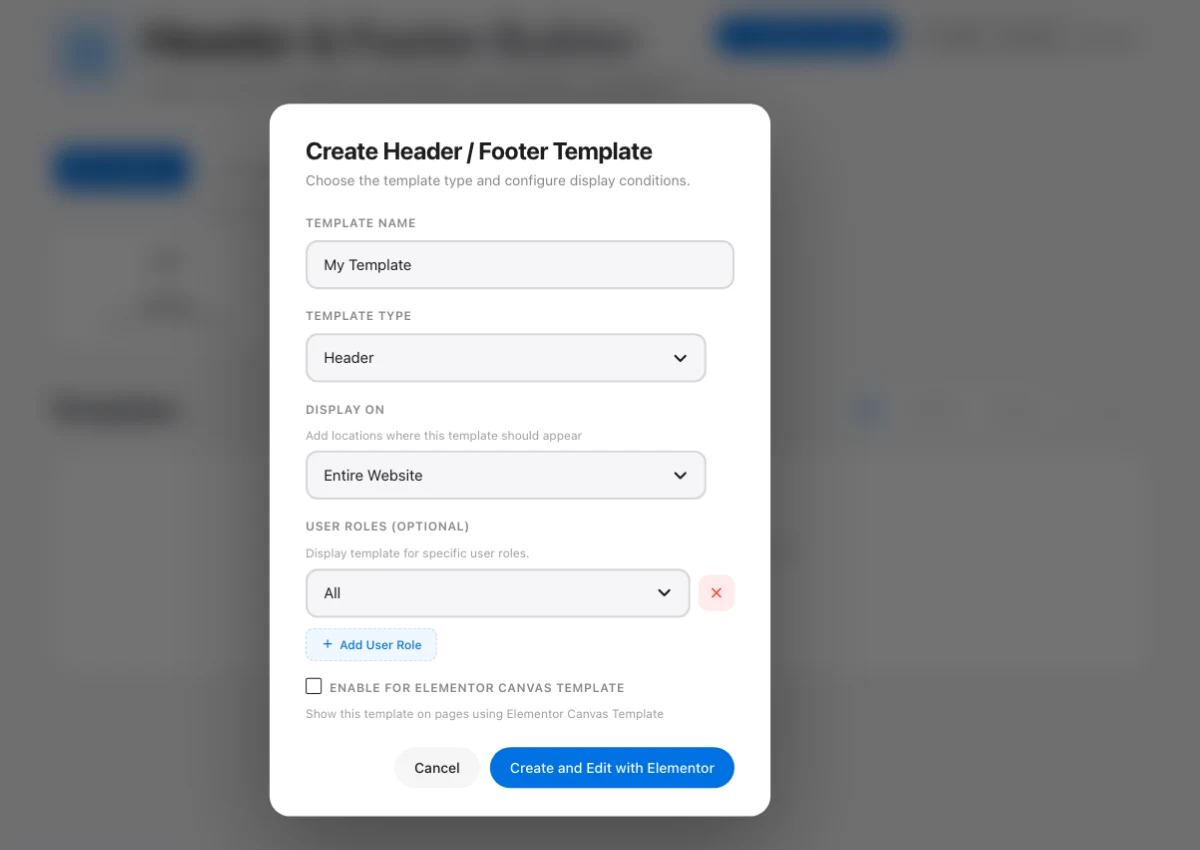
Open Header & Footer in the WordPress admin menu. Click Add New Template. Give the template a name that describes where it will be used, such as Main site header.
Choose Header or Footer
Set Template Type to Header for the top of the site or Footer for its lower navigation area. They are separate templates, so each can have its own display locations.
Choose a display location
Start with Entire Website for a shared layout, or choose a supported narrower location. The picker labels Pro locations, including specific pages/posts/taxonomies and the WooCommerce Shop page. Do not select a location your plan cannot use.
Design the template in Elementor
Add the logo, navigation and primary action for a header. For a footer, group company details and useful links. Use Elementor’s responsive controls to check both layouts at a narrow width.
Check the assigned pages
Publish when ready and open a matching page in a fresh visitor session. Check that the intended header/footer appears once. If you use Elementor Canvas, review the builder’s Enable for Elementor Canvas Template option.
Check the result
Open a page that should match and one that should not. Test the navigation with a keyboard and confirm that the mobile layout does not obscure the content.
Common questions
Do I need Elementor Pro?
No. The basic King Addons builder works with free Elementor.
Why is my header missing on a Canvas page?
Check the builder’s option to enable the template for Elementor Canvas and confirm its display location.